Onboarding
In early 2025, we have introduced our all new Airpane Control Panel / Customer Dashboard. It now offers you a single login to manage all your customers, domains, and hostings. If you previously just had a single hosting at Onlime GmbH, that won't make a big difference for you.
From now on, you need to log in with your email address!
Migrate your Hosting
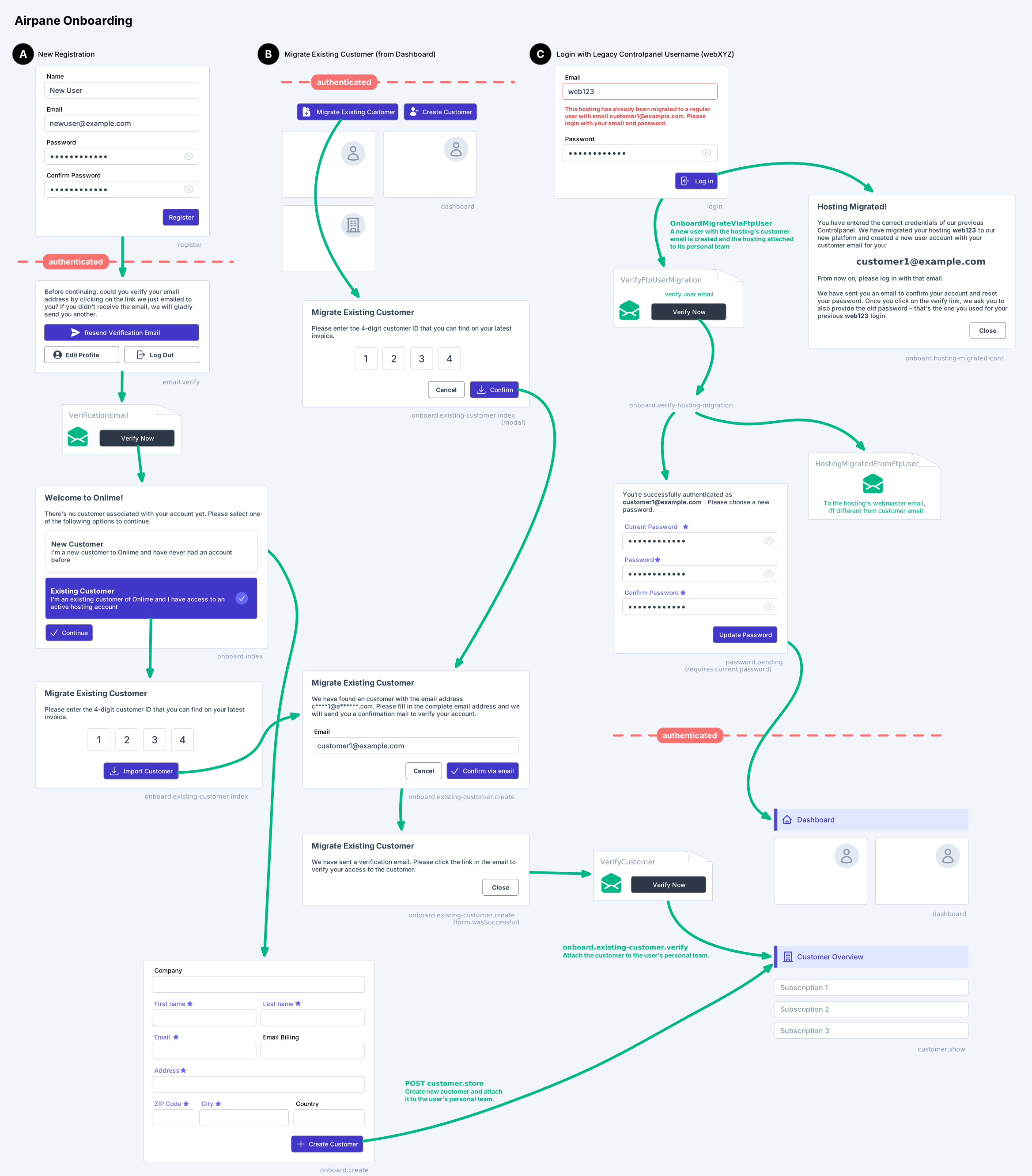
To migrate your existing hosting account to our new platform, we tried to simplify the process as much as possible and offer you 3 different ways:
TIP
Go for option A) New User Registration if you want a fresh start with a new user account. You can provide your 4-digit customer ID to migrate your existing customer right after registration.
Or go for option C) Login with Legacy Controlpanel Username if you belong to the lazy guys and simply want to use the email of the customer we already have on file for your new login. You can only choose this option if you remember your previous Controlpanel credentials.
Option B) Migrate Existing Customer is only meant to be used for those who already have signed up for a user account on our new platform, and wish to migrate an existing customer afterwards. Or if you're some kind of web agency and wish to migrate additional customers in a later step.
A) New User Registration
- Head over to my.onlime.ch and click on "Register".
- Register for a new user account with your email and a new password.
- Verify your email address with the verification link we have sent you.
- Click on New Customer and enter your address information. Or:
- Click on Existing Customer and enter your 4-digit customer ID (can be found on your last invoice).
- We then ask you to enter the customer email. It must match the customer email we already have on file.
- Click on the customer email verification link in the email we have sent you.
B) Migrate Existing Customer
- Choose this option, if you already have signed up for a new user account, but didn't complete the Existing Customer migration in A)
- Once logged in, click on the Migrate Existing Customer button top-right on the dashboard.
- You will then need to enter your 4-digit customer ID and follow the remaining steps as in A)
C) Login with Legacy Controlpanel Username
- This migration path is an option for the lazy guys that don't read anything and simply try to enter their legacy credentials from the old Controlpanel, trying to log in as always in the past.
- On my.onlime.ch, log in with your hosting's credentials (the username/password you are also using for FTP), e.g. a username like
web123(not an email!) - The customer of that hosting will then directly be migrated to a new user account with the same email.
- Click on the verification link in the email we have sent you.
- You are now asked to change your password, by also providing your current password (the previous Controlpanel password you have just entered before).
- From now on, please log in with your email! Remember: If you don't like to continue logging in with that email, you can change it at any time in your profile settings. The user account email is not directly bound to the customer's email. It was just assumed you want to use the same email to simplify this migration path.
Registration/Migration Overview
To give you an in-depth overview of the user account registration and hosting/customer migration path, here's the 3 different options visualised: